Android to Mac, over your own Wi-Fi
Your phone's last few things, at your cursor
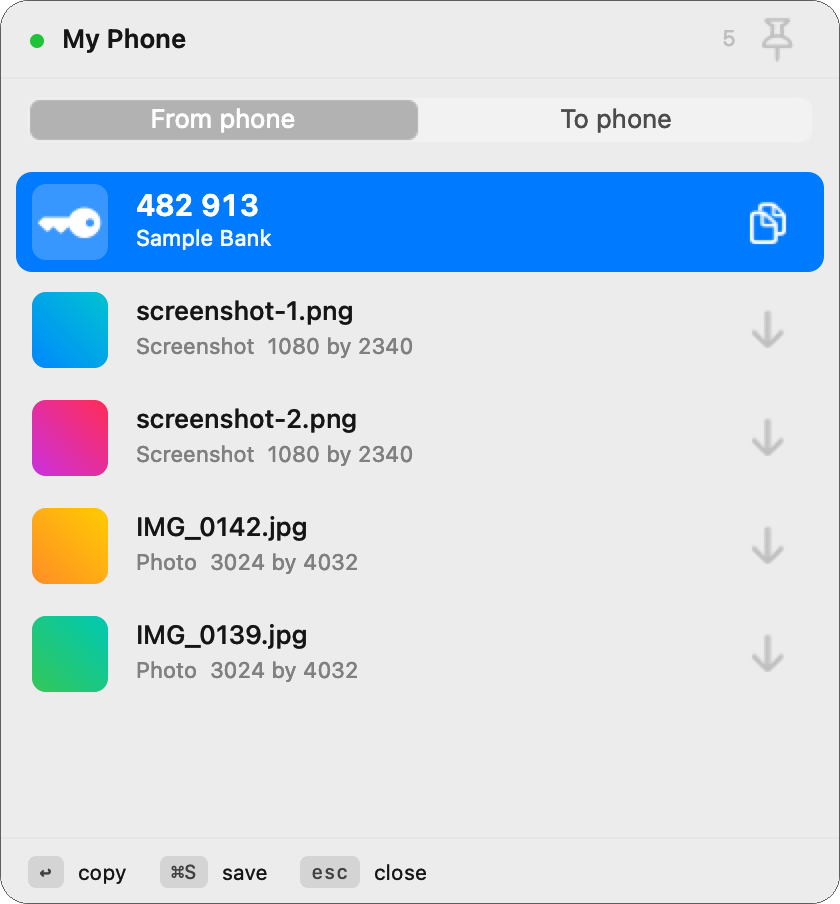
Press ⌥ Space and the code that just landed on your Android phone is already on your Mac's clipboard. So is the screenshot you took thirty seconds ago.
Android app free. Mac app a one-off purchase, no subscription.
- No cable
- No account
- No cloud
- TLS, certificate pinned
- Never reads SMS
What it actually does
Small on purpose. Each feature replaces picking up your phone, reading something off it and typing it out again.
Verification codes, instantly
On your Mac's clipboard before you have looked up. Read from the notification, never your SMS inbox, so banking apps and authenticators work too.
Screenshots and photos
Recent shots sit in the panel with thumbnails. Return copies one, Command S drops it into Downloads. No import step, no album to browse.
Send to your phone
Drag a file onto the panel, push your clipboard with one chord, or right click in Finder and choose Send to phone.
Share from anywhere on Android
tomac is in the share sheet and Quick Settings. Share a link, a photo or a PDF and it lands on your Mac's clipboard.
Encrypted and pinned
TLS end to end. Your Mac pins your phone's certificate when you pair and refuses anything else, so nothing on your Wi-Fi can read or impersonate it.
It just reconnects
No saved IP address to go stale. Your Mac finds your phone by name, so a reboot, a new router or a changed lease costs you nothing.
Set up once, in about a minute
Both devices on the same Wi-Fi. That is the only requirement, and also the whole security model.
-
Install both apps
Open the phone app once and it switches itself on.
-
Pair them
Your Mac shows a six digit number derived from your phone's certificate. Same number on the phone? Tap Allow. Nothing can sit in between.
-
Allow two things
Photos, for screenshots. Notification access, for codes. tomac never asks for SMS or call logs, and cannot see them.
-
Press the hotkey
⌥ Space opens the panel anywhere. ↩ copies, ⌘S saves, esc closes. That is the whole interface.
Questions
Does anything go to the internet?
No. Your Mac talks directly to your phone over your own Wi-Fi. There is no tomac server, no account to create and no copy of anything in a cloud. If your router is off, tomac does not work, which is the clearest proof there is nowhere else for your data to go.
Can other people on my Wi-Fi see my codes?
No. The connection is TLS encrypted, and your Mac pins your phone's exact certificate when you pair. Anything else presenting itself as your phone is refused outright rather than warned about.
The six digit number you compare during setup is computed from that certificate, so if something on the network tried to sit in the middle, the two screens would show different numbers.
Why does it read my notifications?
Because that is the only way to get a verification code on Android without reading your text messages. Google restricts SMS access to your default messaging app, and rightly so.
Reading notifications also works better: it catches codes from banking apps, authenticators and email, which an SMS reader would miss completely. A notification that carries a code sends only the code itself to your Mac, never the rest of the message.
Does it mirror all my notifications to my Mac?
Most of them, unless you turn mirroring off or mute a specific app. tomac skips its own notifications, silent ones, group summaries, anything you have marked secret for your lock screen, and it never reposts a notification just because a progress bar ticked.
Mirroring is on by default. You can turn it off, or mute any app, from the Mac's menu or from your phone.
Does it drain my battery?
It is a small local server that answers when your Mac asks, and it does nothing in between. It keeps running when your phone is asleep, which is deliberate: a code that arrives while your screen is off is exactly the one you want on your Mac.
Does it need a cable, or USB debugging?
Neither. Wi-Fi only. Nothing to enable in developer options and nothing to plug in.
Will it work with an iPhone?
No. iOS does not let an app read notifications from other apps, so the main feature is impossible there. tomac is Android to Mac, and that is the point of the name.
What happens if I get a new phone or router?
A new router or a changed address costs you nothing, because tomac never remembers an address. It finds your phone by name every time.
A new phone means pairing again, which takes about ten seconds.
Why is the Mac app paid and the Android app free?
Because the pair is only useful together, and charging twice for one tool is unfriendly. The Mac app is a one-off purchase with no subscription.